LiteRT.js: Google's High-Performance Web AI Inference Engine, Explained

Google has released LiteRT.js, a JavaScript binding of its on-device inference library LiteRT (formerly TensorFlow Lite), built to run machine learning and AI models directly inside a web browser. The pitch is straightforward: take the same optimized, cross-platform runtime that already powers on-device AI on Android, iOS, and desktop, and make it available to web developers with the same performance characteristics — enhanced user privacy, zero server inference costs, and latency low enough for real-time experiences.
For teams that already ship .tflite models on mobile, LiteRT.js is positioned as a smoother deployment path to the web than the JavaScript-kernel approach of TensorFlow.js. For everyone else, it's a new option for building AI features — text generation, object detection, audio processing — that run entirely client-side, with no round-trip to a server for every inference call.
Table of Contents
- Why this is different from TensorFlow.js
- How LiteRT.js benefits web developers
- 1. PyTorch conversion and tailored quantization
- 2. Native hardware acceleration across CPU, GPU, and NPU
- Performance and real-world impact
- See it in action
- Ultralytics YOLO object detection
- Monocular depth estimation
- 4x image upscaling
- Getting started with LiteRT.js
- What's next
Why this is different from TensorFlow.js
Earlier web AI runtimes like TensorFlow.js relied on JavaScript-based kernels, which left meaningful performance on the table compared to native, platform-specific implementations. LiteRT.js instead compiles Google's actual native runtime — the same one used on mobile and desktop — down to WebAssembly, so the browser gets the real optimizations rather than a JavaScript reimplementation of them.
That runtime targets hardware acceleration through three backends: XNNPACK for CPU inference, ML Drift for GPU inference via WebGPU, and an upcoming NPU path through the WebNN API (currently experimental in Chrome and Edge). The initial release ships with the @litertjs/core npm package and a collection of live demos to try before integrating anything.
How LiteRT.js benefits web developers

Because LiteRT.js shares a unified stack with LiteRT on other platforms, web applications automatically inherit the same performance work, quantization improvements, and hardware optimizations Google ships for Android, iOS, and desktop — rather than a separately-maintained, perpetually-behind web port. Two capabilities stand out for developers evaluating it.
1. PyTorch conversion and tailored quantization
With LiteRT Torch, PyTorch models convert to the LiteRT format in a single step, ready to take advantage of browser-based hardware acceleration immediately. Google publishes a getting-started guide for the conversion flow.
For further size and speed gains, the AI Edge Quantizer lets you configure quantization schemes per layer rather than uniformly across the whole model — trading precision only where the model can afford it, which tends to preserve output quality better than blanket quantization. There's a worked example colab showing the technique on a real model.
2. Native hardware acceleration across CPU, GPU, and NPU
- CPU: XNNPACK, Google's optimized on-device CPU library, with multi-thread support and a relaxed-SIMD build for extra throughput.
- GPU: ML Drift driving WebGPU, which Google positions as its leading on-device GPU acceleration path, now brought to the browser.
- NPU: the WebNN API (experimental in Chrome and Edge) targets dedicated neural processing units for power-efficient, ultra-low-latency inference where the hardware supports it.

Performance and real-world impact
Google benchmarked LiteRT.js against existing web AI runtimes across classical computer vision and audio-processing models. The headline result: LiteRT.js outperformed other web runtimes by up to 3x across both CPU and GPU inference.
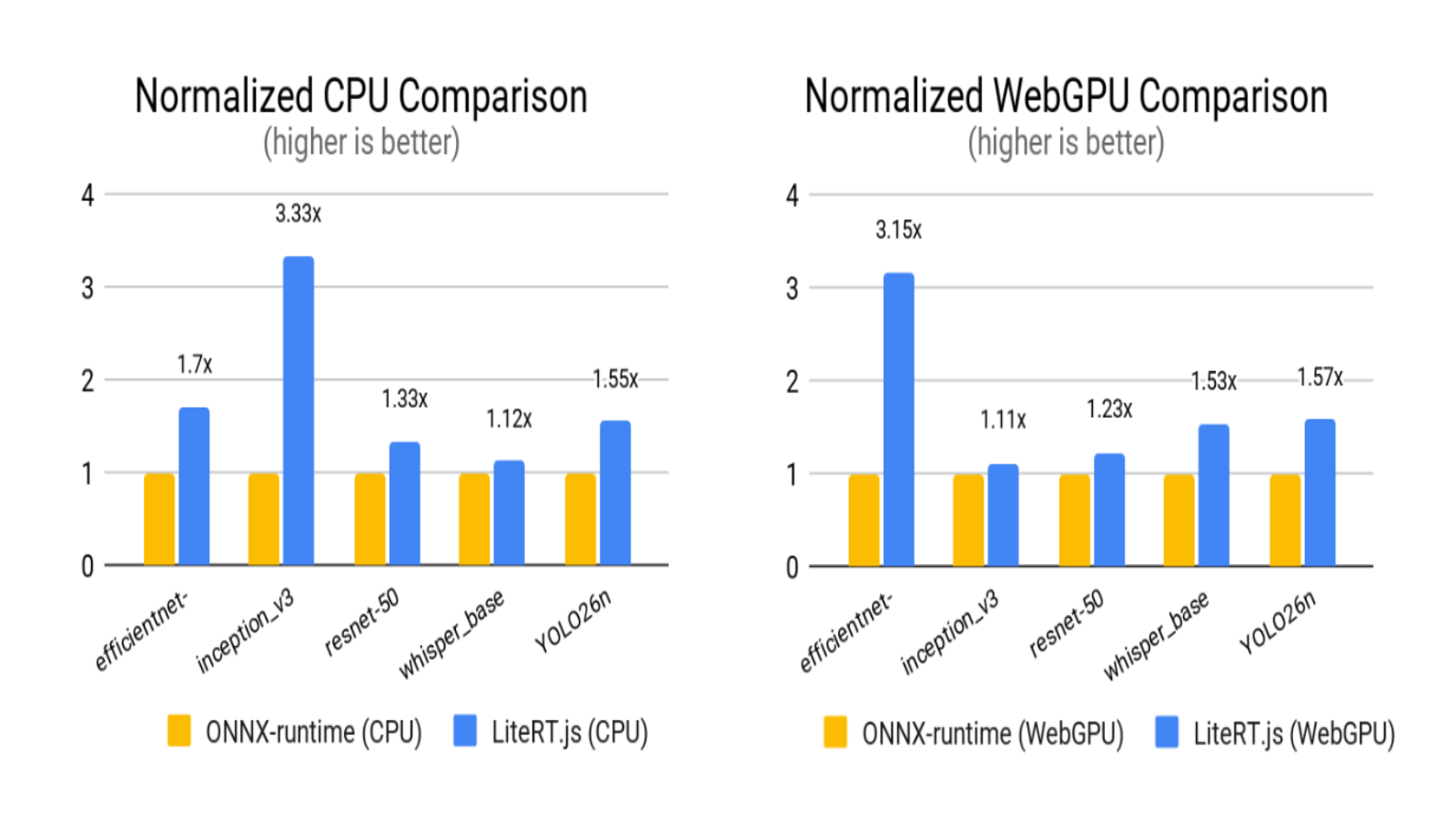
Benchmarks were conducted on a 2024 Apple MacBook Pro with M4 Apple Silicon in a controlled browser environment. Individual results will vary with local GPU capability, thermal throttling, and browser driver optimization.
Google also compared three execution backends directly — CPU via XNNPACK, WebGPU, and WebNN via Apple CoreML — across popular AI model types. For latency-sensitive work like object tracking, audio transcription, or image manipulation, routing inference through the GPU or NPU (WebGPU or WebNN) delivered a 5–60x speedup over standard CPU execution.
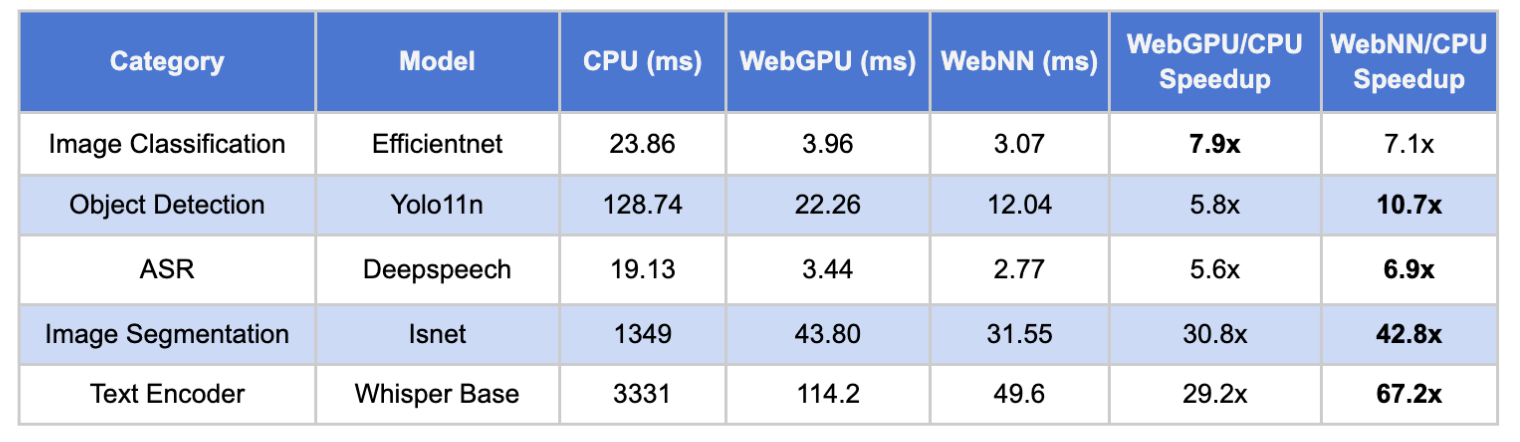
Benchmarks were conducted on a 2024 Apple MacBook Pro with M4 Apple Silicon in a controlled browser environment. Individual results will vary with local GPU capability, thermal throttling, and browser driver optimization.
See it in action
Demo source code is available on the LiteRT GitHub repository and via Ultralytics. A few of the live demos:
Ultralytics YOLO object detection
Ultralytics, the company behind the widely-used YOLO (You Only Look Once) family of real-time object detection and image segmentation models, now ships official LiteRT export support directly in its Python package. That means deploying Ultralytics YOLO models to mobile, edge, and the browser is a matter of a few lines of code, from export straight through to runtime.
Monocular depth estimation
Depth Anything turns a standard webcam feed into an interactive 3D point cloud in real time. Running the Depth-Anything-V2 model through LiteRT.js on WebGPU, the demo calculates per-pixel depth and maps the video into a responsive 3D space, live in the browser.
4x image upscaling
A Real-ESRGAN demo upscales images 4x entirely in the browser, working by upscaling 128×128-pixel patches to 512×512 and reassembling them into the final output image.
Getting started with LiteRT.js
Integrating LiteRT.js is meant to be straightforward whether you're starting fresh or migrating an existing TensorFlow.js pipeline — the library abstracts away hardware-level tuning so you can focus on the model and the UI around it. Here's the shape of loading, compiling with GPU acceleration, and running inference on a .tflite model:
import { loadLiteRt, loadAndCompile, Tensor } from '@litertjs/core';

await loadLiteRt('path/to/wasm/directory/');

const model = await loadAndCompile('path/to/your/model.tflite', { accelerator: webgpu });

const inputTypedArray = new Float32Array(1 * 3 * 244 * 244);
const inputTensor = new Tensor(inputTypedArray, [1, 3, 244, 244]);

const results = await model.run(inputTensor);

// results is a Tensor stored on GPU. To move it to CPU & convert to a
// typedArray:
const resultArray = (await results[0].moveTo('wasm')).toTypedArray();Full setup instructions, more demos, and API reference live in the LiteRT.js documentation.
What's next
Google says the roadmap centers on deeper WebNN integration for native NPU performance, plus more optimized support for on-device generative AI in the browser. In the meantime, a few resources worth bookmarking:
- Models: pretrained .tflite models on Kaggle or the LiteRT Hugging Face Community.
- Start building: the full LiteRT.js documentation.
- Get the package: @litertjs/core on npm.
- Contribute: feedback and bug reports on the GitHub issues page.
- LLM support: LiteRT-LM.js adds browser support for running LLMs, via its own JavaScript API.
- Migrating from TensorFlow.js? Google documents the migration path for existing pipelines.
The bigger picture here is less about any single benchmark and more about what becomes practical once a near-native inference runtime is a first-class citizen of the web platform: AI features that don't leak user data to a server, don't queue behind API rate limits, and don't add network latency to every interaction. For web developers who've been watching client-side AI mature on mobile from the sidelines, LiteRT.js is the clearest signal yet that the same capability is now landing in the browser.
Source: LiteRT.js, Google's high performance Web AI Inference — Google Developers Blog, by Ping Yu, Marko Ristić, Matthew Soulanille, and Chintan Parikh.




Comments