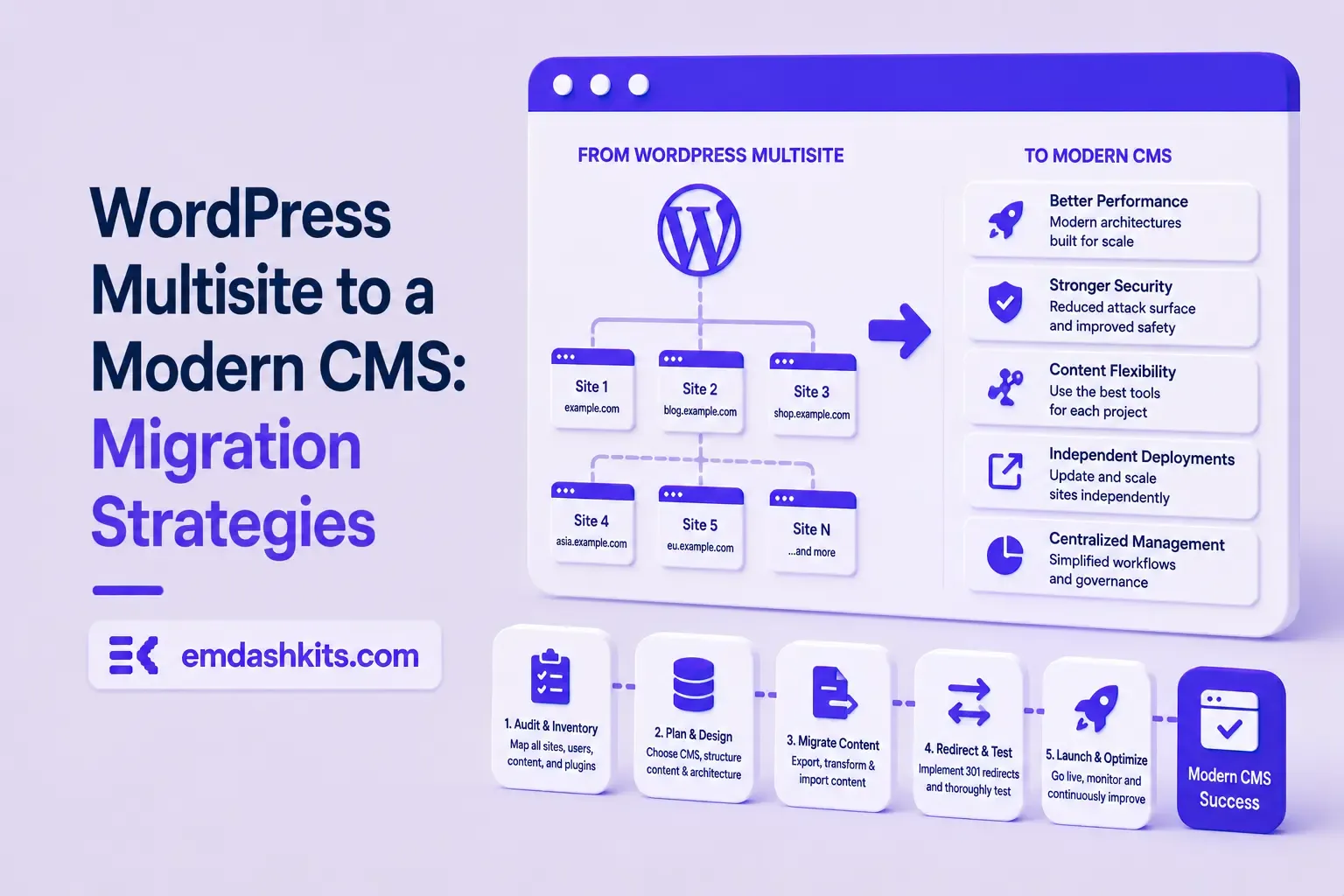
A standard WordPress migration moves one database, one set of tables, one site. Multisite changes the shape of that problem entirely: one database holds a shared set of network-level tables plus a separate set of site-specific tables — prefixed wp_2_, wp_3_ and so on — for every site on the network, all sharing one user table. A mistake in the migration doesn't just break one site, it can break all of them at once.
Global tables (users, usermeta, network options) are shared across every site — you can't migrate site 4 in isolation from the rest of the network.
Site-specific table prefixes have to be preserved or systematically remapped; get this wrong and one site starts reading another site's tables.
Media is stored in per-site subdirectories under one uploads folder — paths reference site IDs, and serialized data referencing those paths breaks if IDs shift during the move.
User capabilities are keyed per-site within a shared user table, so "who can edit what" has to survive the move exactly, not just "who exists."
Pick Your Actual Migration Type First
"Multisite migration" covers several genuinely different jobs, and the strategy changes depending on which one you're doing:
Moving the whole network to new hosting — structure stays identical, only the server changes.
Splitting one subsite out into its own standalone install — the harder direction, since you're extracting site-specific tables from a shared database and rebuilding what used to be global data (users, some settings) as standalone copies.
Consolidating several separate WordPress installs into one multisite network — the reverse problem: merging previously-independent user tables and content without ID collisions.
Migrating an entire network off WordPress to a modern CMS — usually means treating each subsite as an independent content migration, since almost no non-WordPress CMS has a native "multisite" concept to map onto.
This is the case most agencies eventually hit: a multisite network being retired entirely in favor of a headless CMS. There's no direct multisite equivalent to migrate into — instead, each subsite becomes its own site (or its own locale/workspace) in the new system, and shared elements like the user table have to be deliberately redesigned rather than carried over as-is. Treat it as N parallel single-site migrations that happen to share a starting database, and follow the same checklist for each one — don't try to script one bulk multisite-aware export, since the shared-table structure that makes multisite convenient to run is exactly what makes it hard to export cleanly.
Practical Order of Operations
Audit every subsite and its plugin/theme dependencies separately — multisite plugins are often network-activated, which hides per-site opt-outs until you look.
Export global data (users, network options) once, not once per subsite.
Export each site's content independently, keeping track of which media paths and internal links belong to which site ID.
Migrate and verify one subsite completely before touching the next — a partial multisite migration is far harder to debug than a partial single-site one.
If cost is part of why the network is being retired in the first place, our breakdown of the real ongoing cost of running WordPress applies per-subsite too — a multisite network of ten sites usually means ten sites' worth of plugin licenses and maintenance overhead, not one.
TL;DR — A custom session-cookie login flow appeared to succeed on localhost (the OTP verified, the response looked fine) but every subsequent request to a login-gated page treated the visitor as logged out. Identical code worked fine on the live HTTPS site. The cookie's Secure attribute was hardcoded to true — and per the cookie spec, browsers never store or send a Secure cookie over a plain, non-HTTPS connection.
Check the actual Set-Cookie response header and the browser's own cookie storage panel — on localhost over http://, the cookie is sent by the server but never actually stored by the browser.
Root cause
// before -- assumes the app is always served over HTTPS
setCookie("session", token, { secure: true, httpOnly: true });
emdashkits.com
A cookie config that quietly assumes "we're always on HTTPS" breaks the instant you test over plain HTTP, which local dev servers commonly are.
// after -- derive secure from the actual request protocol
const isHttps = request.url.startsWith("https://");
setCookie("session", token, { secure: isHttps, httpOnly: true });
emdashkits.com
Lessons learned
Any Secure-flagged cookie needs to key off the real request scheme, not an assumption baked in once at cookie-creation time.
"Works in production, silently fails in local dev" is a strong signal to check cookie flags before anything else in an auth flow.
Check other cookies in the same codebase for the same hardcoded assumption — if one cookie has this bug, sibling cookies set the same way are worth auditing too.
TL;DR — GA4's gtag.js snippet was installed correctly, the page loaded with no visible JavaScript error, and GA4's real-time report still showed zero activity. The CMS's default Content-Security-Policy had no allowance for analytics domains and no config option to add one — so every request to Google's tracking endpoints was blocked at the browser level before it could fail loudly.
Check the browser's dedicated CSP violation reporting, not the regular console error list — CSP blocks are reported through their own channel, not thrown as normal script errors, so "no console errors" doesn't mean nothing was blocked.
Root cause
The CSP's script-src and connect-src directives had no entry for googletagmanager.com or google-analytics.com, and the CMS exposed no configuration surface to add one — the only way in was patching the CSP directives directly.
// patch-package: add analytics domains to the existing CSP directives
scriptSrc.push("https://www.googletagmanager.com");
connectSrc.push("https://www.google-analytics.com", "https://www.googletagmanager.com");
"No console errors" is not proof nothing was blocked — CSP violations live in their own reporting surface and are easy to miss if you're only scanning for red error text.
Before adding any third-party script tag to a site with a CSP already in place, check the CSP's directives first rather than assuming a silently-empty analytics dashboard means a snippet-installation mistake.





Comments