What Is a Hybrid CMS? Explained with Examples

By now, you may have come across a handful of CMS-related terms: traditional, headless, composable. But there's another approach that sits somewhere in between: the hybrid CMS. If you've been weighing the trade-offs between a beginner-friendly, all-in-one platform and the flexibility of a fully headless setup, a hybrid CMS might be the middle ground you're looking for. In this guide, we'll explain what a hybrid CMS is, how it works, and walk through some real-world examples to make the concept concrete.
Table of Contents
- What Is a Hybrid CMS?
- How Does a Hybrid CMS Work?
- Hybrid CMS vs. Traditional and Headless CMS
- Real-World Examples of Hybrid CMS Platforms
- Example 1: A Retail Website with a Companion App
- Example 2: A Media Company Publishing to Multiple Channels
- Example 3: A SaaS Company Testing a New Landing Page Framework
- Example 4: An Emerging Platform Bridging Both Worlds
- Advantages of a Hybrid CMS
- Potential Drawbacks
- Is a Hybrid CMS Right for You?
- Final Thoughts
What Is a Hybrid CMS?
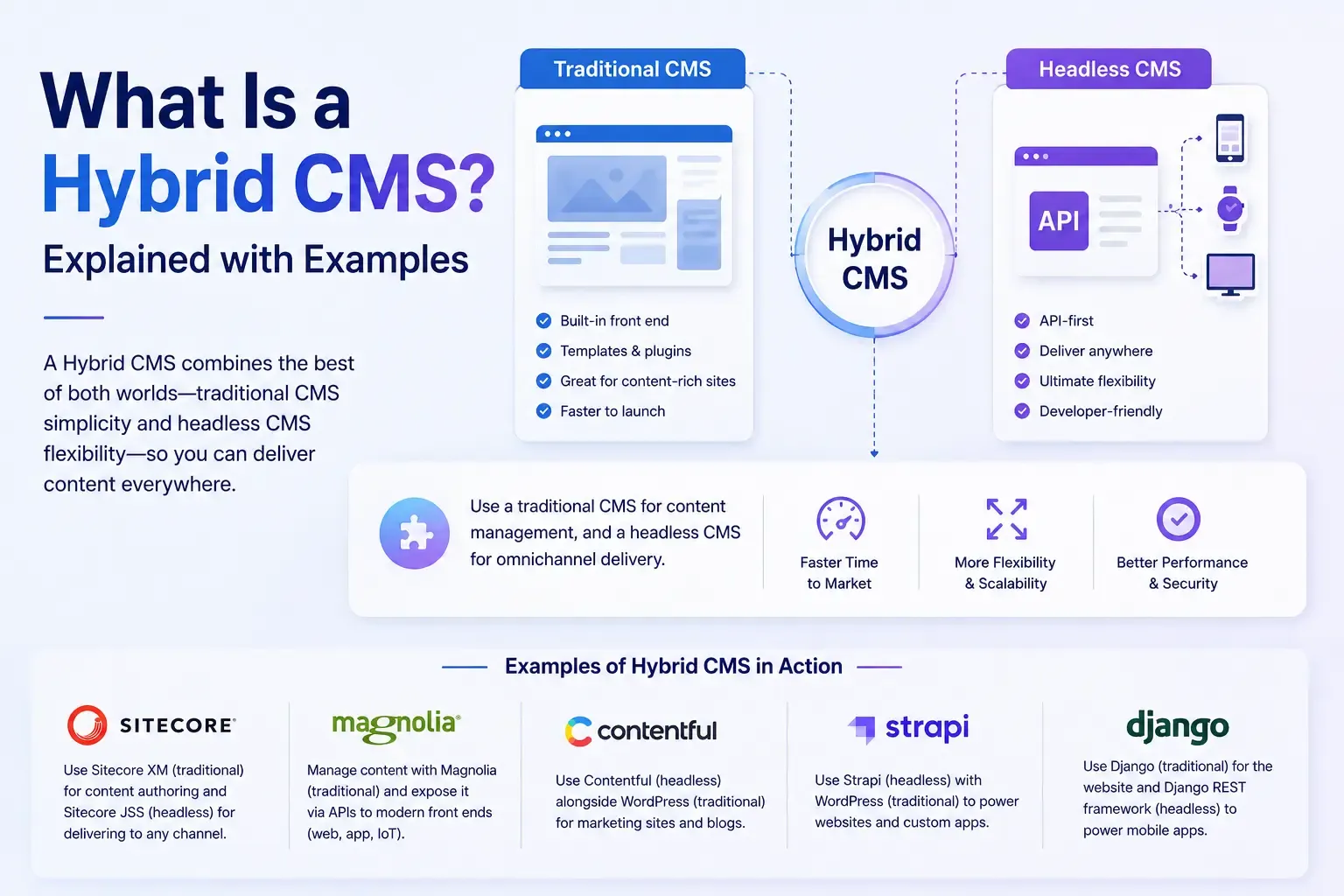
A hybrid CMS is a content management system that combines the best of both traditional and headless architecture. It gives you a built-in front end for managing and displaying content out of the box, just like a traditional CMS, while also offering API access so developers can pull that same content into custom applications, mobile apps, or other digital channels when needed.
In short, a hybrid CMS doesn't force you to choose between simplicity and flexibility. You get the convenience of a ready-to-use front end for standard use cases, plus the option to go headless for specific projects that need more customization.
This is different from a fully headless CMS, which has no built-in front end at all and requires developers to build the entire presentation layer from scratch. A hybrid CMS gives you that option without making it mandatory.
How Does a Hybrid CMS Work?
A hybrid CMS typically operates on two tracks simultaneously:
- Traditional mode: Content editors use the CMS's built-in tools to create and publish content directly to a website, complete with themes, templates, and a WYSIWYG editor, similar to how a traditional CMS works.
- Headless mode: At the same time, that same content is accessible through an API, allowing developers to pull it into a mobile app, a custom-built microsite, an IoT device, or any other platform that needs it.
Because both modes pull from the same content source, teams don't have to duplicate content or maintain separate systems for different channels. A blog post created for the main website can also be surfaced through the API for a mobile app, without any extra work from the content team.
Hybrid CMS vs. Traditional and Headless CMS
To understand where a hybrid CMS fits, it helps to see how it compares to the other two approaches.
Feature | Traditional CMS | Headless CMS | Hybrid CMS |
|---|---|---|---|
Built-in front end | Yes | No | Yes, optional |
API content delivery | Limited or none | Yes | Yes |
Beginner-friendliness | High | Low | High |
Developer flexibility | Low | High | Moderate to high |
Multi-channel delivery | Difficult | Built-in strength | Built-in strength |
Setup complexity | Low | High | Moderate |
If you want a deeper breakdown of how traditional and headless systems differ on their own, our guide on CMS vs. headless CMS walks through that comparison in detail. A hybrid CMS essentially borrows strengths from both sides of that comparison rather than forcing you to pick one.
It's also worth noting how a hybrid CMS differs from a composable CMS. A composable approach treats your entire tech stack as a set of interchangeable, best-of-breed services, while a hybrid CMS is still a single platform, just one that happens to offer both a built-in front end and API access. Hybrid systems are generally less modular than fully composable stacks, but they're also simpler to adopt and manage.
Real-World Examples of Hybrid CMS Platforms
To make this more concrete, here are a few examples of how hybrid CMS platforms show up in practice:
Example 1: A Retail Website with a Companion App
Imagine a retail brand using a hybrid CMS to manage its main website through the built-in editor, complete with product pages, blog content, and landing pages. At the same time, the company's mobile app pulls the same product descriptions and promotional content through the CMS's API, ensuring pricing and messaging stay consistent across both platforms without duplicating work.
Example 2: A Media Company Publishing to Multiple Channels
A news organization might use the traditional front end of a hybrid CMS to publish articles to its main website. Meanwhile, that same content gets pulled via API into a smart TV app, a voice assistant briefing, and a partner syndication feed, all from the same original article, without needing a developer to manually copy content into each format.
Example 3: A SaaS Company Testing a New Landing Page Framework
A software company might rely on a hybrid CMS's built-in front end for most of its marketing site, while using the API to power a small set of custom-built landing pages developed in a modern JavaScript framework for a specific campaign, giving the marketing team flexibility without a full platform migration.
Example 4: An Emerging Platform Bridging Both Worlds
Newer entrants in the CMS space are also exploring how to blend these approaches. For instance, our overview of EmDash CMS explores a platform built with a modern, API-first foundation that reflects some of the same flexibility principles found in hybrid and composable systems, worth a look if you're curious how newer CMS platforms are approaching this balance.
Advantages of a Hybrid CMS
- Best of both worlds: You get an easy-to-use, built-in front end without giving up API access for custom development.
- Lower barrier to entry: Content teams can get started quickly without waiting on developers to build a front end from scratch.
- Multi-channel ready: Like headless systems, hybrid platforms make it easier to deliver content across websites, apps, and other digital touchpoints.
- Gradual flexibility: Businesses can start with the built-in front end and expand into custom, API-driven experiences as needs grow, without switching platforms entirely.
Potential Drawbacks
- Less flexibility than fully headless or composable systems: Since you're still tied to a single vendor's platform, you don't get quite the same freedom to swap out individual components.
- Can create inconsistent workflows: Teams may end up managing both traditional and headless workflows simultaneously, which can add complexity if not planned carefully.
- Still vendor-dependent: Unlike a composable stack, you're generally locked into that one platform's ecosystem, even if it offers more flexibility than a purely traditional CMS.
Is a Hybrid CMS Right for You?
A hybrid CMS tends to be a strong fit for:
- Businesses that want the simplicity of a built-in editor but need occasional API access for specific projects.
- Teams transitioning from a traditional CMS toward more flexible, multi-channel content delivery without a full architectural overhaul.
- Organizations that don't yet need the full modularity of a composable stack but want more options than a purely traditional platform offers.
If your business is planning a large-scale, multi-platform strategy from the ground up, a fully headless or composable approach might serve you better in the long run. But if you want flexibility without a steep learning curve, a hybrid CMS offers a practical middle path.
Final Thoughts
A hybrid CMS bridges the gap between traditional and headless architecture, giving you a ready-to-use front end alongside the option to deliver content via API when you need it. It's a great fit for teams who want flexibility without fully committing to the added complexity of a headless or composable setup.
As your content strategy evolves, understanding where hybrid systems fit alongside traditional, headless, and composable options will help you choose the right foundation for your website, both today and as your needs grow.




Comments