API-First CMS Explained: Benefits and Use Cases

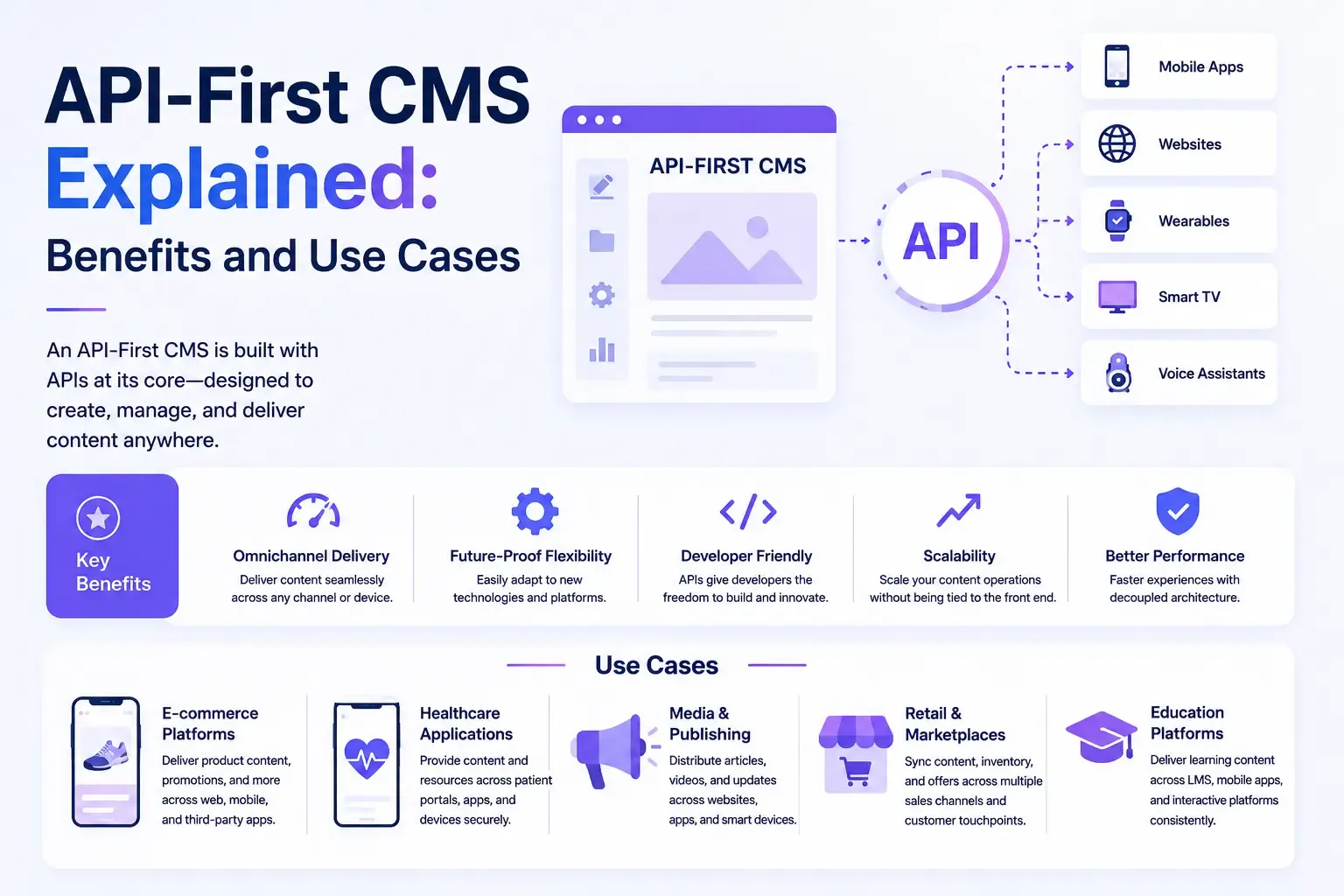
As content management systems continue to evolve, you've probably noticed one phrase showing up again and again: "API-first." It's often mentioned alongside headless and composable architecture, but it describes something a little more specific and foundational. In this guide, we'll break down what an API-first CMS is, why it matters, and where it's most commonly used.
Table of Contents
- What Is an API-First CMS?
- API-First vs. Headless vs. Composable
- Key Characteristics of an API-First CMS
- 1. Comprehensive, Well-Documented APIs
- 2. Consistent Data Structures
- 3. Multiple API Types
- 4. Built for Integration
- 5. Developer Experience as a Priority
- Benefits of an API-First CMS
- Faster, More Flexible Development
- Seamless Multi-Channel Delivery
- Easier Integration With Other Tools
- Better Long-Term Adaptability
- Improved Collaboration Between Teams
- Common Use Cases for an API-First CMS
- Multi-Platform Businesses
- E-Commerce Brands
- Media and Publishing Companies
- Businesses Building Composable Architecture
- Teams Bridging Traditional and Modern Workflows
- AI and Automation-Driven Workflows
- Potential Drawbacks
- Is an API-First CMS Right for You?
- Final Thoughts
What Is an API-First CMS?
An API-first CMS is a content management system designed from the ground up with the API as the primary way of interacting with content, rather than as an afterthought bolted onto an existing system. Every piece of content, every field, every media asset, is accessible through a well-documented API from day one, and that API is treated as a core product feature rather than a secondary add-on.
This is a subtle but important distinction from many headless CMS platforms. A system can technically be headless, meaning it has no built-in front end, while still having an API that was added later or feels like an afterthought. An API-first CMS, by contrast, is built with the API as the foundation of its entire architecture. If you want to understand the broader concept of separating content from presentation, our guide on what a headless CMS is is a good place to start.
API-First vs. Headless vs. Composable
These terms overlap quite a bit, which is part of why they're often confused. Here's a simple way to think about how they relate:
- Headless describes the absence of a built-in front end, content is delivered via API instead of being rendered directly by the CMS.
- API-first describes a design philosophy, the API isn't just available, it's the primary, well-documented, developer-friendly interface the entire system is built around.
- Composable describes a broader architectural strategy, assembling your tech stack from multiple best-of-breed services, often connected through API-first tools.
In practice, most modern API-first CMS platforms are also headless, since a strong API naturally requires decoupling content from a fixed presentation layer. And most composable architectures rely on API-first tools as their building blocks. For a closer look at how composable systems function, our article on what a composable CMS is breaks that down further, and our comparison of CMS vs. headless CMS is a useful reference if you're still getting familiar with the basic terminology.
Key Characteristics of an API-First CMS
Not every CMS with an API qualifies as truly API-first. Here are some of the traits that typically define this category:
1. Comprehensive, Well-Documented APIs
Every function available in the admin interface, like creating content, managing media, or configuring taxonomies, is also available through the API, with clear, developer-friendly documentation.
2. Consistent Data Structures
Content is stored and delivered in predictable, structured formats, usually JSON, making it easy for developers to work with programmatically across different projects and platforms.
3. Multiple API Types
Many API-first platforms offer more than one way to access content, such as REST and GraphQL, giving developers flexibility depending on their project's needs.
4. Built for Integration
API-first systems are designed to plug easily into other tools, whether that's a front-end framework, a third-party search provider, or an AI agent, rather than requiring extensive custom workarounds.
5. Developer Experience as a Priority
SDKs, sandbox environments, detailed changelogs, and responsive developer support are often treated as core product features, not afterthoughts.
Benefits of an API-First CMS
Faster, More Flexible Development
Because the API is the primary interface, developers can build front-end experiences using whatever framework or technology best suits the project, without being boxed in by a CMS's built-in templating system.
Seamless Multi-Channel Delivery
An API-first CMS makes it straightforward to deliver the same content across websites, mobile apps, smart devices, and emerging platforms, all pulled from a single source of truth.
Easier Integration With Other Tools
Since API-first platforms are built for interoperability, they tend to integrate more smoothly with other services, like personalization engines, e-commerce platforms, or analytics tools, which is especially important for businesses building composable stacks.
Better Long-Term Adaptability
As new devices, frameworks, and platforms emerge, an API-first foundation makes it easier to adapt without rearchitecting your entire content system.
Improved Collaboration Between Teams
With a well-documented, stable API, different teams, marketing, engineering, and product, can work more independently, pulling content as needed without stepping on each other's workflows.
Common Use Cases for an API-First CMS
Multi-Platform Businesses
Companies that need to deliver consistent content across a website, mobile app, and other digital touchpoints benefit significantly from an API-first foundation, since content only needs to be created once.
E-Commerce Brands
Retailers often use API-first CMS platforms to manage product content that needs to appear consistently across a website, app, marketplace listings, and even in-store digital displays.
Media and Publishing Companies
News organizations and publishers frequently rely on API-first systems to syndicate content across owned platforms, partner sites, smart TV apps, and voice assistants, all from a single article.
Businesses Building Composable Architecture
Organizations adopting a fully composable stack rely on API-first tools as the connective tissue between their CMS, search provider, personalization engine, and other specialized services.
Teams Bridging Traditional and Modern Workflows
Some businesses aren't ready to go fully headless but still want API access for specific projects. In these cases, a hybrid CMS can offer a practical middle ground, combining a built-in front end with API-first flexibility where it's needed most.
AI and Automation-Driven Workflows
As AI agents become more capable of handling content tasks directly, a strong, well-documented API becomes essential. Newer platforms are starting to build with this specifically in mind. Our overview of EmDash CMS, for example, looks at a platform designed with AI-agent interaction as a core part of its architecture from the start.
Potential Drawbacks
While an API-first CMS offers a lot of flexibility, it's not without trade-offs:
- Requires development resources: Since there's no reliance on a built-in front end, you'll need developers to build and maintain the presentation layer.
- Steeper learning curve: Teams unfamiliar with API-driven workflows may face a longer onboarding process compared to a traditional, all-in-one CMS.
- Ongoing integration maintenance: As you connect more tools and services, keeping everything in sync requires careful planning and occasional upkeep.
Is an API-First CMS Right for You?
An API-first CMS tends to be the right choice if:
- You're managing content across multiple platforms or plan to in the near future.
- Your team has development resources to build and maintain a custom front end.
- You're building or planning to build a composable tech stack.
- You want long-term flexibility to adapt as new platforms and technologies emerge.
If you're a smaller business without in-house developers, or you just need a simple, single-channel website, a traditional CMS or a more beginner-friendly hybrid CMS might serve you better in the short term.
Final Thoughts
An API-first CMS puts the API at the center of its design, rather than treating it as an add-on feature. This foundation enables faster development, easier multi-channel delivery, and smoother integration with the other tools in your tech stack, making it a natural fit for businesses building headless, composable, or AI-driven content strategies.
As you evaluate CMS options, understanding where API-first design fits alongside headless, composable, and hybrid approaches will help you choose a foundation that can grow alongside your business.




Comments