MACH Architecture Explained (Microservices, API-first, Cloud, Headless)

MACH Architecture Explained (Microservices, API-first, Cloud, Headless)

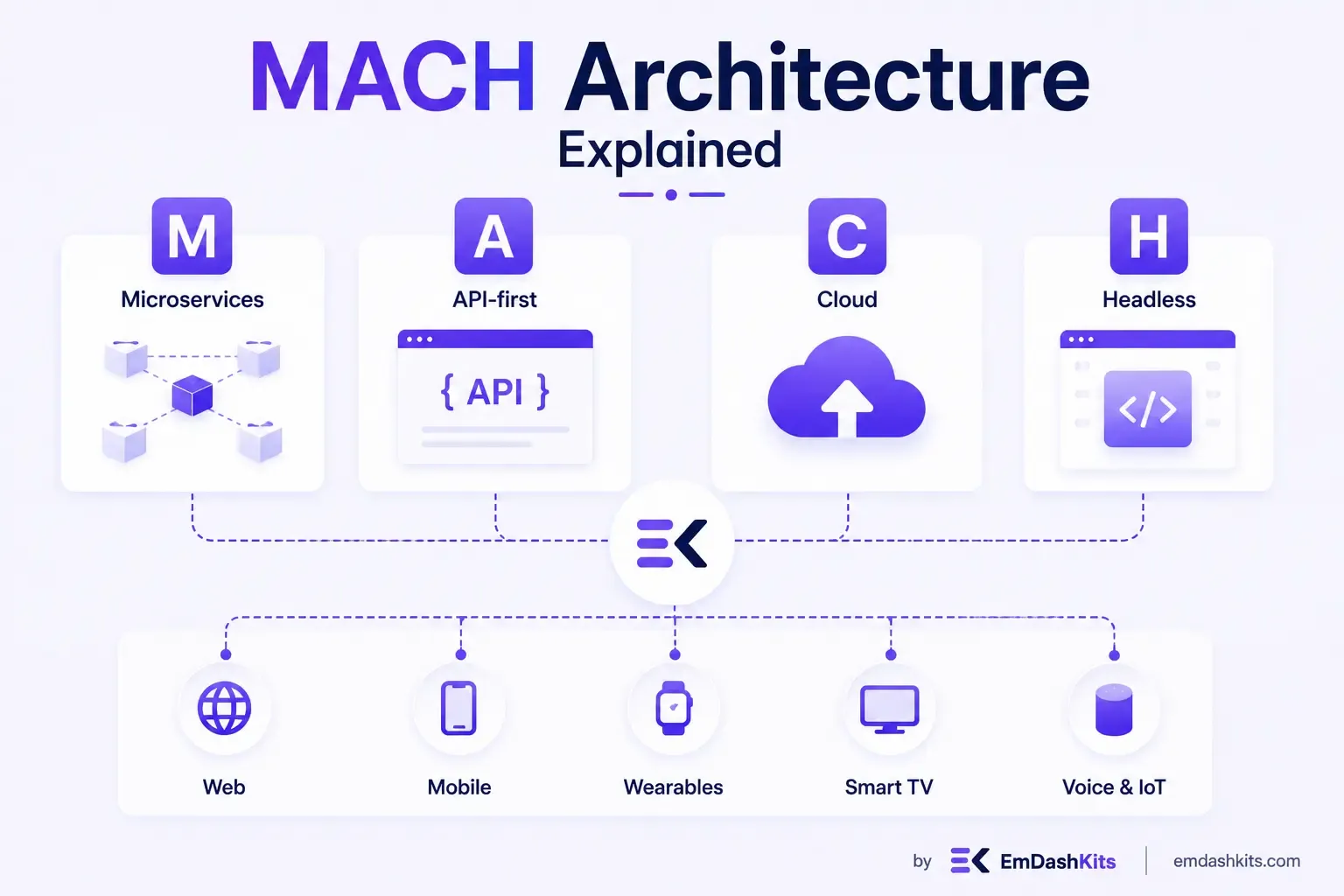
Most teams don't wake up one day and decide to rebuild their entire stack around an acronym. MACH — Microservices, API-first, Cloud-native, and Headless — became the standard label for a shift that was already happening: breaking monolithic platforms into smaller, independently deployable pieces that talk to each other over APIs. This guide walks through what each pillar actually means, why they're meant to be adopted together, and where teams commonly get it wrong.

Table of Contents
  1. What MACH Stands For
  2. Microservices
  3. API-First
  4. Cloud-Native
  5. Headless
  6. Why the Four Pillars Are Meant to Work Together
  7. MACH vs. Composable — Are They the Same Thing?
  8. Where MACH Shows Up First: AI-Native Workflows
  9. Common Pitfalls When Adopting MACH
  10. Is MACH Right for Your Team?

What MACH Stands For

MACH is a coalition-backed term (the MACH Alliance formalized it in 2020) describing four architectural principles that, combined, replace the single vendor-locked monolith with a set of best-of-breed, interchangeable services.

Microservices

Instead of one large application handling search, checkout, content, and personalization inside a single codebase, each capability ships as its own independently deployable service. A bug in the recommendation engine doesn't take down checkout. A team can redeploy the search service ten times a day without touching anything else.

API-First

Every capability is designed API-first — the API isn't a bolt-on integration layer added after the product ships, it's the product's actual interface. See our guide on what API-first CMS means in practice for a deeper look at this specific piece.

Cloud-Native

Services are built to run on elastic cloud infrastructure from day one — auto-scaling, containerized or serverless, deployed across regions — rather than retrofitted onto cloud servers that still assume a single fixed machine.

Headless

Content and business logic are fully decoupled from presentation. There's no bundled front end forcing a specific templating engine or theme system — you own the front end and pull content in through APIs. If you haven't already, it's worth reading our beginner's guide to headless CMS before going further into MACH specifically, since headless is the piece most people encounter first.

Why the Four Pillars Are Meant to Work Together

It's possible to be headless without being cloud-native, or API-first without being built on microservices. MACH's actual claim is narrower and more useful: these four principles reinforce each other. Microservices only stay manageable at scale if each one is genuinely API-first, so other services (and other teams) can integrate without reading the source code. Cloud-native elasticity matters more once you have a dozen independently scaling services instead of one predictable monolith. And headless only delivers on its promise of omnichannel delivery — web, app, IoT, kiosk — if the underlying services were built API-first to begin with.

This is also the piece most "MACH-washing" vendors skip. A platform can market itself as MACH-compliant while still shipping a tightly coupled monolith with a REST API glued on top. The MACH Alliance's own certification process exists specifically because self-reported compliance became unreliable as the term got popular.

Read also:

MACH vs. Composable — Are They the Same Thing?

Not quite, though they're closely related and often used together. MACH describes the architectural properties a given service should have. Composable architecture is the broader strategy of assembling your entire stack from interchangeable, best-of-breed pieces — MACH is what makes a piece composable in the first place. Think of MACH as the spec each Lego brick has to meet, and composable as the act of actually building something out of those bricks.

Where MACH Shows Up First: AI-Native Workflows

The clearest practical driver for MACH adoption right now isn't a redesign or a rebrand — it's AI. Structured content models and API-first design are what let an AI agent create content, run personalization experiments, or restructure a taxonomy programmatically, in ways a monolithic system with content trapped in raw HTML templates simply can't support. This is also why AI-native CMS platforms lean so heavily on MACH principles from the start rather than retrofitting them in later.

Common Pitfalls When Adopting MACH

  • Treating it as a technology purchase instead of an organizational change — teams still organized around a single monolith release cycle won't get the benefits of independently deployable services.
  • Skipping content governance. More services and more content models mean more places for inconsistency to creep in without clear ownership.
  • Underestimating data privacy and integration complexity once content, commerce, and personalization each live in a different vendor's system.
  • Falling for "MACH-washing" — a vendor claiming compliance with the label while the underlying platform is still a monolith with an API bolted on.

None of these are reasons to avoid MACH. They're reasons to treat it the way most successful adopters do: as an incremental migration with clear ownership, not a big-bang rewrite. For a look at how this plays out for larger organizations specifically, see our guide to what enterprises actually need from a CMS.

Is MACH Right for Your Team?

MACH architecture pays off when you need to ship to multiple channels, when your content or commerce logic needs to scale independently of your marketing site, or when you're already running into the ceiling of a monolithic platform. If you're a small team shipping a single marketing site, the operational overhead of managing several independent services may not be worth it yet — a well-built headless or hybrid setup can get you most of the benefits with far less complexity. Why more businesses are making the switch to headless in 2026 digs into that decision in more detail.


Share

Comments

Write a comment

Related Articles

Login Works in Production but Fails on localhost: The secure Cookie Flag Gotcha

July 16, 2026

Login Works in Production but Fails on localhost: The secure Cookie Flag Gotcha

Google Analytics (GA4) Not Tracking Anything and No Console Errors: Check Your CSP First

July 16, 2026

Google Analytics (GA4) Not Tracking Anything and No Console Errors: Check Your CSP First

Native Module Build Fails on Shared Hosting (node-gyp, Old glibc/Python): The .npmrc Fix

July 16, 2026

Native Module Build Fails on Shared Hosting (node-gyp, Old glibc/Python): The .npmrc Fix

Login Works in Production but Fails on localhost: The secure Cookie Flag Gotcha

Login Works in Production but Fails on localhost: The secure Cookie Flag Gotcha

TL;DR — A custom session-cookie login flow appeared to succeed on localhost (the OTP verified, the response looked fine) but every subsequent request to a login-gated page treated the visitor as logged out. Identical code worked fine on the live HTTPS site. The cookie's Secure attribute was hardcoded to true — and per the cookie spec, browsers never store or send a Secure cookie over a plain, non-HTTPS connection.

Table of Contents
  1. Diagnostic
  2. Root cause
  3. Fix
  4. Lessons learned

Diagnostic

Check the actual Set-Cookie response header and the browser's own cookie storage panel — on localhost over http://, the cookie is sent by the server but never actually stored by the browser.

Root cause

// before -- assumes the app is always served over HTTPS
setCookie("session", token, { secure: true, httpOnly: true });
emdashkits.com

A cookie config that quietly assumes "we're always on HTTPS" breaks the instant you test over plain HTTP, which local dev servers commonly are.

Read also:

Fix

// after -- derive secure from the actual request protocol
const isHttps = request.url.startsWith("https://");
setCookie("session", token, { secure: isHttps, httpOnly: true });
emdashkits.com

Lessons learned

  • Any Secure-flagged cookie needs to key off the real request scheme, not an assumption baked in once at cookie-creation time.
  • "Works in production, silently fails in local dev" is a strong signal to check cookie flags before anything else in an auth flow.
  • Check other cookies in the same codebase for the same hardcoded assumption — if one cookie has this bug, sibling cookies set the same way are worth auditing too.
Share
Previous Article

Google Analytics (GA4) Not Tracking Anything and No Console Errors: Check Your CSP First

Comments

Write a comment

Related Articles

Google Analytics (GA4) Not Tracking Anything and No Console Errors: Check Your CSP First

July 16, 2026

Google Analytics (GA4) Not Tracking Anything and No Console Errors: Check Your CSP First

Native Module Build Fails on Shared Hosting (node-gyp, Old glibc/Python): The .npmrc Fix

July 16, 2026

Native Module Build Fails on Shared Hosting (node-gyp, Old glibc/Python): The .npmrc Fix

Uploaded Images Disappear After Every Deploy on Shared Hosting (and Other Reverse-Proxy Gotchas)

July 16, 2026

Uploaded Images Disappear After Every Deploy on Shared Hosting (and Other Reverse-Proxy Gotchas)

Google Analytics (GA4) Not Tracking Anything and No Console Errors: Check Your CSP First

Google Analytics (GA4) Not Tracking Anything and No Console Errors: Check Your CSP First

TL;DR — GA4's gtag.js snippet was installed correctly, the page loaded with no visible JavaScript error, and GA4's real-time report still showed zero activity. The CMS's default Content-Security-Policy had no allowance for analytics domains and no config option to add one — so every request to Google's tracking endpoints was blocked at the browser level before it could fail loudly.

Table of Contents
  1. Diagnostic
  2. Root cause
  3. Lessons learned

Diagnostic

Check the browser's dedicated CSP violation reporting, not the regular console error list — CSP blocks are reported through their own channel, not thrown as normal script errors, so "no console errors" doesn't mean nothing was blocked.

Root cause

The CSP's script-src and connect-src directives had no entry for googletagmanager.com or google-analytics.com, and the CMS exposed no configuration surface to add one — the only way in was patching the CSP directives directly.

// patch-package: add analytics domains to the existing CSP directives
scriptSrc.push("https://www.googletagmanager.com");
connectSrc.push("https://www.google-analytics.com", "https://www.googletagmanager.com");
emdashkits.com
Read also:

Lessons learned

  • "No console errors" is not proof nothing was blocked — CSP violations live in their own reporting surface and are easy to miss if you're only scanning for red error text.
  • Before adding any third-party script tag to a site with a CSP already in place, check the CSP's directives first rather than assuming a silently-empty analytics dashboard means a snippet-installation mistake.
Share
Previous Article

Native Module Build Fails on Shared Hosting (node-gyp, Old glibc/Python): The .npmrc Fix

Next Article

Login Works in Production but Fails on localhost: The secure Cookie Flag Gotcha

Comments

Write a comment

Related Articles

Login Works in Production but Fails on localhost: The secure Cookie Flag Gotcha

July 16, 2026

Login Works in Production but Fails on localhost: The secure Cookie Flag Gotcha

Native Module Build Fails on Shared Hosting (node-gyp, Old glibc/Python): The .npmrc Fix

July 16, 2026

Native Module Build Fails on Shared Hosting (node-gyp, Old glibc/Python): The .npmrc Fix

Uploaded Images Disappear After Every Deploy on Shared Hosting (and Other Reverse-Proxy Gotchas)

July 16, 2026

Uploaded Images Disappear After Every Deploy on Shared Hosting (and Other Reverse-Proxy Gotchas)

