Static Site Generator vs CMS: Which One Do You Need?

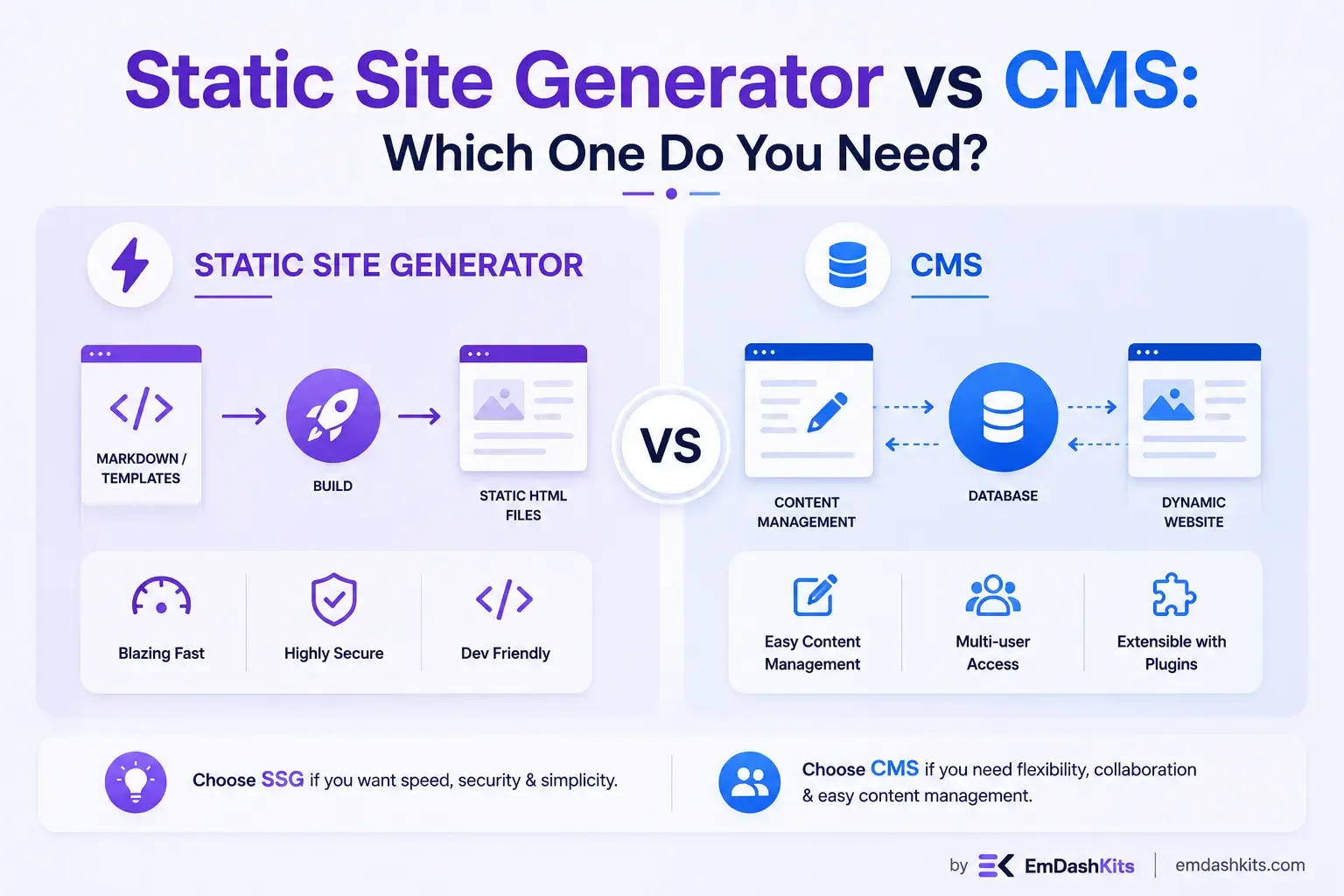
Choosing how to build a website used to come down to a handful of familiar options. Today, that decision is more nuanced. Alongside traditional content management systems, static site generators have carved out a serious share of the web development landscape, and the two are often pitted against each other as if only one can win. In practice, the choice is rarely that simple. This guide unpacks what a static site generator actually does, how it differs from a CMS, and how to figure out which approach — or combination of both — fits your project.
Table of Contents
What Is a Static Site Generator?
A static site generator (SSG) is a tool that takes source files, typically written in Markdown, along with templates and data, and compiles them into a set of static HTML, CSS, and JavaScript files ahead of time. Rather than assembling a page the moment someone requests it, an SSG does that work once, during a build process, and the resulting files are then served as-is from a server or CDN.
The appeal is straightforward. Sites built with static site generators tend to load quickly and serve each request with minimal delay, which search engines tend to reward with better rankings. There's no database call, no server-side rendering logic firing on every visit, just pre-built files delivered fast.
Popular static site generators include Astro, Hugo, Next.js, Eleventy, and Gatsby, each with its own philosophy on templating, framework support, and build performance.
What Is a CMS?
A content management system, in the traditional sense, is software that lets you create, edit, and publish content through a user interface, without needing to touch code directly. A CMS tightly couples the front end and back end into a single package, generating a site's code dynamically each time it's requested rather than relying on a pre-built step.
This is the model most people picture when they think of a CMS. Platforms like WordPress and Joomla dominate this space, and WordPress alone is estimated to power roughly 43.6% of all websites on the internet, an extraordinary share considering how many alternatives now exist.
Of course, "CMS" has grown into a broader category than that. Many modern platforms have moved toward a decoupled or headless model, where content management is separated entirely from how that content gets displayed. If that distinction is new to you, our guide on what a headless CMS is is a useful starting point before going further here.
Static Site Generator vs CMS: The Core Difference
The clearest way to frame this comparison isn't "static vs dynamic" in the abstract, it's about when the content gets assembled into a page.
- A CMS (in its traditional form) builds each page dynamically, at the moment a visitor requests it, pulling from a live database.
- A static site generator builds every page ahead of time, during a deployment or build step, and simply serves the finished files afterward.
That single difference in timing cascades into nearly every other trade-off between the two approaches: speed, security, scalability, and how content teams actually get their work published.
Factor | Static Site Generator | Traditional CMS |
|---|---|---|
Page generation | Pre-built at deploy time | Generated per request |
Speed | Very fast, served from CDN | Slower, depends on server load |
Security | Fewer attack vectors, no live database | More exposed via themes/plugins/database |
Content editing | Often requires Markdown or Git familiarity | User-friendly WYSIWYG editors |
Non-technical editing | Limited without an added CMS layer | Built-in and accessible |
Scalability | Handles traffic spikes gracefully | Can strain under heavy load |
Real-time content | Requires rebuilds or client-side APIs | Native |
Why Developers Gravitate Toward Static Site Generators
Static site generators have been on a genuine growth curve rather than a passing trend. By 2026, over 40% of new websites were being built using static site generators, up from 28% in 2023, and roughly 65% of developers reported using an SSG on at least one project that year.
A few reasons keep showing up in that shift:
Performance. With no server-side processing happening on each visit, pages load close to instantly, which matters both for user experience and for search rankings.
Security. Because there's no database or server-side code running at request time, there's simply less surface area for an attacker to exploit.
Developer control. SSGs don't lock developers into a particular templating system. They're free to choose their preferred framework and build exactly the front end the project calls for.
Lower infrastructure overhead. Static files can be hosted almost anywhere, from a basic CDN to free static hosting tiers, without the ongoing server costs that come with dynamic rendering.
Why Teams Still Choose a Traditional CMS
None of this makes static site generators the obvious choice for every situation. Traditional CMS platforms remain dominant for good reasons.
Non-technical content editing. A marketing team publishing daily blog posts doesn't want to write Markdown or push commits to Git. A CMS's WYSIWYG editor removes that friction entirely.
Real-time content needs. Anything that depends on live data, a comment section, a personalized dashboard, dynamic pricing, is native to a CMS's request-time rendering model in a way that a purely static site struggles to replicate without extra tooling.
Mature ecosystems. Decades of themes, plugins, and community support mean a traditional CMS can often solve a specific need with an existing plugin rather than custom development.
Where the Line Actually Blurs
Here's the part that gets left out of a lot of "vs" comparisons: for most production teams, this isn't a binary decision anymore. The organizations that struggle tend to treat this as an either-or choice, while the ones that succeed build architectures where a headless CMS and a static site generator each handle what they're best at.
In this hybrid pattern, a headless CMS manages content through a familiar editorial interface, while a static site generator pulls that content at build time and compiles it into fast, pre-rendered pages. Editors get the interface they're used to, visitors get pre-rendered speed, and developers still get full API access to the underlying content. This is essentially the foundation of JAMstack architecture, and it's worth reading our breakdown of JAMstack CMS if you want to see how that combination works in practice.
This pairing has become common enough that some data suggests it's less a trend and more the new baseline. One industry survey of over 1,700 CMS decision-makers found that a large majority of teams that had already migrated toward this model, or planned to, reported measurable improvements after the switch, including a notable increase in ROI and a meaningful lift in team productivity (source: Naturaily's CMS for Modern Web report).
If you're exploring how a modern, API-first CMS fits into this kind of build-time workflow, it's worth reading our overview of API-first CMS architecture, which explains why that foundation matters for pulling content into a static build in the first place. Newer platforms are also emerging specifically to serve this space; our look at EmDash CMS, built on the Astro framework, is one example of a CMS designed with static-site workflows in mind from the outset.
Which One Do You Actually Need?
A few honest questions will get you to an answer faster than any feature checklist.
Choose a static site generator if:
- Your content changes infrequently and doesn't need to reflect live, real-time data.
- Site speed and security are top priorities.
- You have developers comfortable working with a build process and Git-based workflows.
- You're building documentation, a marketing site, a portfolio, or a blog with a manageable number of pages.
Choose a traditional CMS if:
- Non-technical team members need to publish content independently, frequently, and without developer involvement.
- Your site depends on real-time or highly personalized content.
- You want the convenience of an established plugin and theme ecosystem.
Choose a hybrid or headless-plus-SSG approach if:
- You want the editorial convenience of a CMS combined with the speed and security of static output.
- You're managing content across multiple channels and want a single source feeding several front ends. Our comparison of CMS vs. headless CMS is a good next stop if you're still deciding between these underlying content models.
Final Thoughts
The static site generator vs CMS debate makes for a tidy headline, but the more accurate framing is: how much of your site actually needs to be dynamic, and how much can be pre-built for speed and security? For a growing number of teams, the honest answer is "some of both," which is exactly why hybrid, headless-plus-SSG architectures have become the default rather than the exception.
If you're still weighing where your project fits, start with your content team's workflow and your site's need for real-time data. Those two factors alone will point you toward a static site generator, a traditional CMS, or the combination that's increasingly become the industry standard.




Comments