JAMstack CMS: What It Is and Why Developers Love It

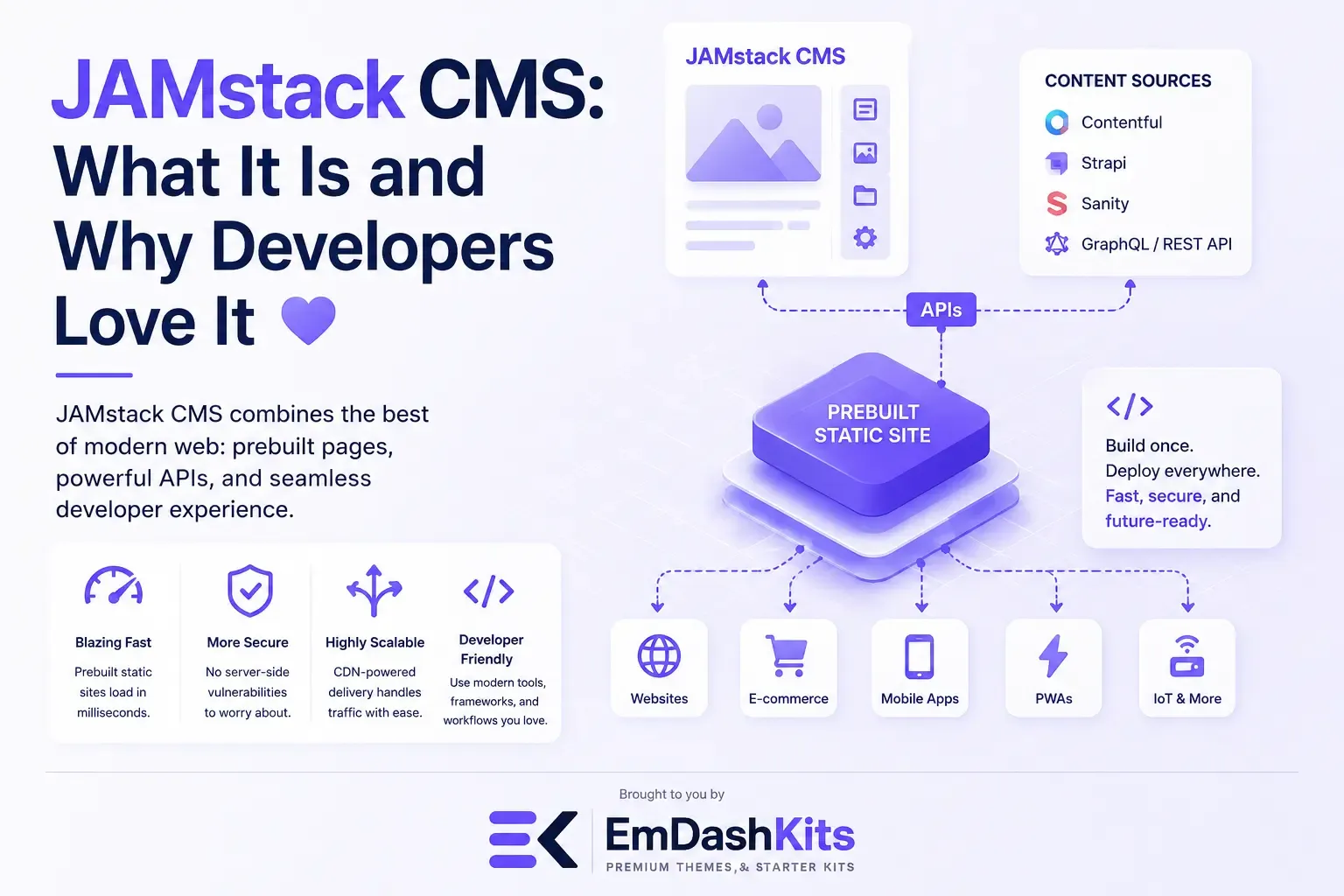
If you've spent any time in developer communities over the past few years, you've probably heard the term "JAMstack" come up, often paired with words like "fast," "secure," and "modern." But what does JAMstack actually mean when it comes to content management, and why has it become such a favorite among developers? In this guide, we'll explain what a JAMstack CMS is, how it works, and why it's earned such a loyal following.
Table of Contents
- What Is JAMstack?
- What Is a JAMstack CMS?
- How Does a JAMstack CMS Work?
- Why Developers Love JAMstack CMS Platforms
- 1. Speed
- 2. Security
- 3. Scalability
- 4. Developer Freedom
- 5. Better Developer Experience
- JAMstack CMS vs. Other CMS Approaches
- Common Use Cases for JAMstack CMS
- Potential Drawbacks to Consider
- Popular JAMstack CMS Platforms
- Is a JAMstack CMS Right for You?
- Final Thoughts
What Is JAMstack?
Before diving into JAMstack CMS specifically, it helps to understand the JAMstack concept itself. JAMstack stands for JavaScript, APIs, and Markup. It's a web development architecture built around three core principles:
- JavaScript handles dynamic functionality on the client side.
- APIs handle any server-side or backend operations, like fetching content or processing form submissions.
- Markup refers to pre-built HTML, typically generated ahead of time rather than rendered on the fly by a server.
Instead of generating pages dynamically every time a visitor requests them, JAMstack sites are pre-built and served as static files from a content delivery network (CDN). Any dynamic functionality is handled separately through JavaScript and APIs.
What Is a JAMstack CMS?
A JAMstack CMS is a content management system designed to work within this architecture. Rather than generating web pages dynamically like a traditional CMS, a JAMstack CMS stores and manages content that gets pulled in during a build process, producing static files that are then deployed to a CDN.
This makes JAMstack CMS platforms inherently headless, since there's no built-in front end rendering pages on request. If you're not yet familiar with that underlying concept, our guide on what a headless CMS is covers the basics of how content and presentation get separated.
How Does a JAMstack CMS Work?
Here's a simplified breakdown of the typical workflow:
- Content creation: Editors add and manage content through the CMS's dashboard, just like with any other CMS.
- Build process: When content changes, a static site generator (like Astro, Next.js, Gatsby, or Hugo) pulls that content via API and generates pre-built HTML pages.
- Deployment to a CDN: Those static files are deployed to a content delivery network, allowing pages to load extremely quickly from servers located close to the visitor.
- Dynamic functionality via JavaScript and APIs: Anything that needs to be dynamic, like a shopping cart, comments section, or search bar, is handled client-side through JavaScript calling out to APIs, rather than through server-side rendering.
Because pages are pre-built rather than generated on each request, JAMstack sites tend to load significantly faster and are less vulnerable to many common server-side attacks.
Why Developers Love JAMstack CMS Platforms
1. Speed
Since pages are pre-built and served as static files from a CDN, JAMstack sites typically load much faster than sites relying on server-side rendering for every request. There's no database query or server processing happening in real time when a visitor loads the page.
2. Security
With no live database connection or server-side rendering happening on each request, there are far fewer attack vectors for hackers to exploit. Static files are inherently more secure than dynamically generated pages tied to a live backend.
3. Scalability
Because content is served as static files from a CDN, JAMstack sites can handle sudden traffic spikes far more gracefully than traditional, server-rendered websites, without needing to scale up backend infrastructure.
4. Developer Freedom
JAMstack CMS platforms give developers the freedom to choose their own static site generator and front-end framework, rather than being locked into a specific templating system. This flexibility is part of why JAMstack fits naturally into a broader composable CMS strategy, where teams pick best-of-breed tools for each part of their stack.
5. Better Developer Experience
Modern JAMstack tooling tends to integrate well with Git-based workflows, version control, and CI/CD pipelines, letting developers work the way they already prefer to work on other software projects.
JAMstack CMS vs. Other CMS Approaches
It's worth clarifying how JAMstack CMS fits alongside other terms you may have encountered.
- Compared to a traditional CMS: A traditional CMS generates pages dynamically on each request and typically includes a built-in front end. JAMstack flips this by pre-building pages ahead of time. Our comparison of CMS vs. headless CMS covers this distinction in more depth.
- Compared to a hybrid CMS: A hybrid CMS offers both a built-in front end and API access, giving teams the option to go headless selectively. JAMstack CMS platforms are typically fully headless by design, without a built-in front-end fallback.
- Compared to an API-first CMS: JAMstack CMS platforms are almost always built with an API-first philosophy, since the entire architecture depends on pulling content via API during the build process. For more on what that means, see our guide on API-first CMS.
Common Use Cases for JAMstack CMS
- Marketing websites and landing pages: Fast load times directly improve conversion rates, making JAMstack a popular choice for marketing sites.
- Documentation sites and blogs: Content-heavy sites benefit from JAMstack's speed and simplicity, especially when content doesn't change on every single request.
- E-commerce storefronts: Many modern e-commerce platforms use JAMstack principles for product pages, pairing static content with dynamic APIs for cart and checkout functionality.
- Portfolio and small business sites: Developers building lightweight, fast-loading sites for individual clients often favor JAMstack for its performance and lower hosting costs.
Potential Drawbacks to Consider
JAMstack isn't the right fit for every project. A few trade-offs worth knowing:
- Build times can grow with large sites: Since pages are pre-built, very large websites with thousands of pages can experience longer build times whenever content changes.
- Requires developer involvement: Like other headless approaches, JAMstack CMS platforms typically require development resources to set up and maintain the front end.
- Real-time content updates need extra planning: Because content is pre-built rather than generated live, truly real-time content (like live sports scores) requires additional client-side API calls rather than relying on the static build alone.
Popular JAMstack CMS Platforms
A few widely used platforms that fit into the JAMstack ecosystem include:
- Contentful
- Sanity
- Netlify CMS (Decap CMS)
- Storyblok
- Strapi
Newer platforms are also emerging in this space. Our overview of EmDash CMS, built on the Astro framework, is a good example of how newer tools are approaching JAMstack-friendly, API-first content management with a modern, developer-focused design.
Is a JAMstack CMS Right for You?
A JAMstack CMS tends to be a great fit if:
- Site speed and performance are top priorities.
- You have development resources comfortable working with static site generators and modern JavaScript frameworks.
- Your content doesn't require constant, real-time updates on every page load.
- Security and scalability are important considerations for your project.
If you need frequent, real-time content updates across a very large site, or you don't have developer resources to manage a build process, other approaches, like a traditional or hybrid CMS, might be a better starting point.
Final Thoughts
JAMstack CMS platforms have earned their popularity among developers by combining speed, security, and flexibility in a way that traditional, server-rendered systems often struggle to match. By pre-building content ahead of time and handling dynamic functionality through JavaScript and APIs, JAMstack offers a modern approach to web development that's well-suited to today's performance and security expectations.
As you explore CMS options, understanding how JAMstack fits alongside headless, composable, hybrid, and API-first architecture will help you choose the right foundation for your next project.




Comments